
Inbound Call Handling: The Complete Process, Best Practices, and How to Guide Every Agent to Resolution

Inbound call handling is the end-to-end process of answering, routing, and resolving incoming customer calls, from the first ring to the final note in your CRM. Most guides stop at "answer fast and be polite." That gets you through the first ten seconds of the call. It doesn't help your agent when the customer's issue turns out to be more complicated than the script anticipated, which is where most calls actually go sideways.
This guide covers the full inbound call handling process step by step, the best practices that keep it consistent, and, because it's the part most resources skip, exactly how to make sure every agent, not just your best ones, can diagnose and resolve the issue in front of them without guessing.
What Is Inbound Call Handling?
Inbound call handling is the structured process a business uses to receive, route, and resolve phone calls initiated by customers, prospects, or the public. It covers everything that happens between a customer dialing your number and the call being logged as resolved: greeting the caller, identifying what they need, verifying who they are, working through their issue, escalating if necessary, and documenting the outcome.
It's called "inbound" because the customer initiates the call — the opposite of outbound calling, where your team places the call (for sales prospecting, appointment reminders, or proactive follow-ups). Inbound call handling is reactive by nature: the customer already has a problem or question, which means the stakes for getting it right, the first time, are higher.
Done well, inbound call handling improves first call resolution, reduces average handle time, lowers call abandonment, and makes customers feel like they reached a business that actually has its act together. Done poorly, it's the single fastest way to lose a customer who was still willing to give you a chance.
Inbound vs. Outbound Call Handling
The distinction comes down to who starts the conversation and why:
| Inbound | Outbound | |
|---|---|---|
| Who initiates | The customer | Your team |
| Typical intent | Support, questions, complaints, account issues | Sales, follow-ups, appointment confirmations |
| Agent posture | Reactive, diagnose and resolve | Proactive, pursue a specific outcome |
| Core tools | IVR, ACD, call routing, guided call flows | Auto-dialers, CRM sequencing, call scripts |
| Primary KPIs | First call resolution, AHT, abandonment rate | Contact rate, conversion rate |
Many contact centers handle both, often with the same agents trained to switch modes depending on the queue. But the skills and the tooling that make each one work well are genuinely different — an agent who's great at working a sales script may still struggle with an unscripted billing dispute, because inbound calls don't follow a predictable path the way outbound calls do.
The Inbound Call Handling Process: 7 Steps

A well-run inbound call moves through seven distinct stages. Skipping or rushing any one of them is usually where things go wrong — most escalations and repeat calls can be traced back to a step that got skipped, not a step that was done badly.
1. Greet the Caller
Answer within 2–3 rings. A rushed or robotic greeting sets the tone for the whole call before the customer has said a word. A standard greeting — company name, agent name, an open offer to help — establishes competence and puts the customer at ease immediately.
2. Identify the Intent
Ask open-ended questions and let the caller explain the issue fully before jumping to a solution. Interrupting to guess at the problem is one of the most common ways agents waste a call — they solve the problem they assumed instead of the one the customer actually has.
3. Verify Customer Identity
Confirm account details, order numbers, or security information before discussing anything sensitive. This step protects the customer's data and your business, and it's also the step most likely to get skipped under time pressure, which is exactly when it matters most.
4. Review Customer Context
Pull up the caller's history — past tickets, purchases, prior conversations — before asking them to repeat information they've already given your business. Nothing erodes trust faster than making a returning customer explain their situation from scratch.
5. Diagnose and Troubleshoot
This is the step every other guide covers in a single sentence and moves past. It's also the step where the outcome of the call is actually decided.
Once an agent knows who's calling and why, they need a reliable way to get from "here's the problem" to "here's the fix" — and this is where most contact centers quietly rely on one of their best agents' memory instead of a real system.
There are three common approaches, and they are not equally effective:
Static scripts tell an agent what to say. They're fine for greetings and closings, but they break down the moment a customer's situation doesn't match the exact scenario the script was written for — which, on inbound calls, is most of the time. A script has no branching logic; it can't account for "yes, but the account is also flagged for fraud" or "yes, but this is their third call this month."
Knowledge base lookups put the information in front of the agent, but the agent still has to know what to search for, judge which article applies, and figure out the right sequence of steps themselves. This works reasonably well for experienced agents and poorly for anyone still ramping up — a real cost, since contact centers are constantly onboarding new agents against a backdrop of high turnover.
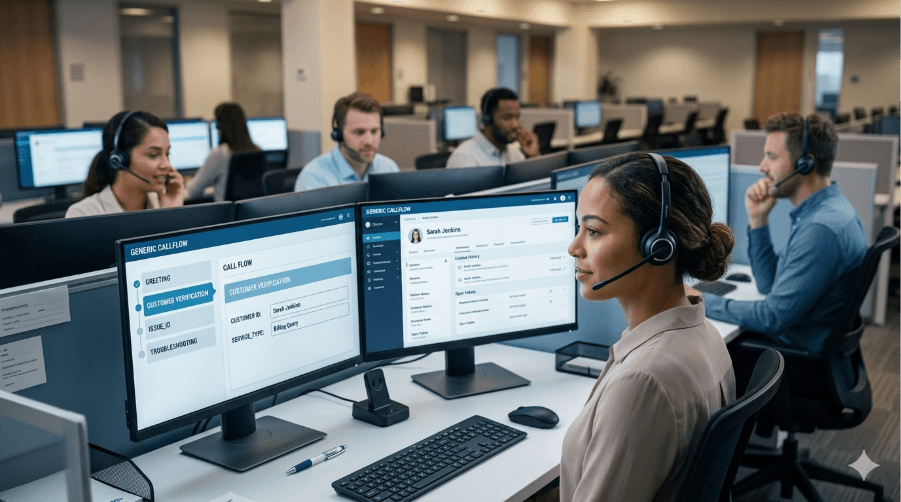
Guided decision trees tell an agent what to do next, based on the specific answers the customer has already given. Instead of "here's an article about refund policies," a decision tree asks the next relevant question, incorporates the answer, and narrows down to the correct resolution path automatically — verification steps, troubleshooting branches, and escalation triggers built in, so the agent doesn't have to hold the whole process in their head. A new agent working from a guided decision tree can handle a complex billing dispute or a multi-step technical issue with the same consistency as your most experienced rep, because the expertise is built into the flow itself, not locked in one person's head.

This is the gap between call centers that handle complexity well and ones that only handle the easy calls well. Anyone can write a script for "customer wants to reset their password." Almost no one has a system that reliably guides a brand-new agent through "customer wants to reset their password, but the account is also disputing a charge, and the phone number on file doesn't match." Guided decision trees are built for exactly that second scenario.
6. Escalate If Necessary
Not every call should be resolved by the agent who answers it, and that's fine — the goal isn't zero escalations, it's fast, correct escalations. Handoffs should happen the moment it's clear the issue needs a specialist, a supervisor, or tier-2 support, with full context passed along so the customer doesn't have to repeat themselves again. A guided workflow makes this step nearly automatic: escalation triggers can be built directly into the decision tree, so the agent isn't left guessing whether "this feels like it's above my pay grade."
7. Document and Wrap Up
Log the outcome, update CRM notes, and schedule any follow-up before closing the call out. This step is easy to rush and easy to skip under queue pressure, but incomplete documentation is exactly what forces the next agent — or the same customer, on their next call — to start from zero again.
Common Challenges in Inbound Call Handling
Most inbound call handling problems trace back to one of these:
- Inconsistent agent performance. Your best agent and your newest hire are working from the same job description but not the same actual process, because the "process" mostly lives in experience rather than in anything written down and enforced.
- Long ramp time for new agents. Getting a new hire from "knows the product" to "handles a complex call confidently" typically takes weeks of shadowing and trial-and-error, because most training relies on tribal knowledge rather than a structured system they can lean on from day one.
- High average handle time on non-routine calls. Simple calls are fast for everyone. Complicated calls are where AHT balloons, usually because the agent is searching for the right answer instead of being guided to it.
- Compliance risk. In regulated industries, skipping a required disclosure or verification step isn't just a bad customer experience — it's a liability. Scripts and memory are unreliable ways to guarantee a compliance step never gets missed.
- Escalations that shouldn't have been escalations. Calls get bumped up not because they were genuinely complex, but because the agent didn't have a clear next step and defaulted to "let me transfer you."
Notice that almost none of these are routing problems. They're what happens after the call is already routed to the right person — which is exactly the part of inbound call handling that gets the least attention in most software and most advice.
Best Practices for Inbound Call Handling
The fundamentals matter and are worth stating plainly, even if they're not where the real differentiation happens:
- Answer promptly: 2–3 rings is the standard; every additional ring measurably increases abandonment.
- Practice active listening: let the customer finish, then summarize the issue back to confirm you understood it correctly.
- Aim for first call resolution: a callback is a worse outcome for the customer and a more expensive one for you.
- Use CRM context: never make a returning customer repeat information you already have.
- Stay calm and professional under pressure: tone carries as much information to a frustrated caller as the actual words.
- Keep documentation complete: the next person to touch this account, human or otherwise, depends on it.
These practices set the floor. They're table stakes, not a strategy — every contact center claims to do them, and the ones that actually pull it off consistently are the ones that back these habits with a real process rather than good intentions.
Routing Technology vs. Resolution Technology
Most inbound call handling advice focuses on one layer of the stack: getting the call to the right person. IVR menus route callers based on their selections. ACD (automatic call distribution) queues and assigns calls to available or skill-matched agents. These tools solve a real problem — they make sure the call lands with someone qualified to help.
But routing the call correctly only sets up the conversation. It doesn't tell the agent what to do once they pick up. That's a second, separate layer of the technology stack, and it's the one most inbound call handling strategies leave to chance:
| Layer | Job | Tools |
|---|---|---|
| Routing | Get the call to the right agent | IVR, ACD, skill-based routing |
| Resolution | Guide that agent to the right outcome | Guided decision trees, dynamic workflows |

Process Shepherd operates in the resolution layer. It turns your best agents' judgment into a guided decision tree that any agent can follow — branching questions, built-in verification steps, embedded knowledge base context, and automatic escalation triggers, all surfaced in real time as the call unfolds. New agents handle complex, non-routine calls with the same consistency as your most experienced reps, average handle time drops because agents aren't hunting for answers mid-call, and compliance steps stop depending on any one person's memory. It plugs directly into the CRM and helpdesk tools your team already uses, so the guidance shows up inside the same screen the agent is already working from.
If your routing is solid but your calls are still inconsistent, slow to resolve, or overly dependent on your most tenured agents, the gap usually isn't in how the call gets answered — it's in what happens for the next several minutes after it does.
Key Metrics to Track

Three metrics tell you most of what you need to know about inbound call handling performance:
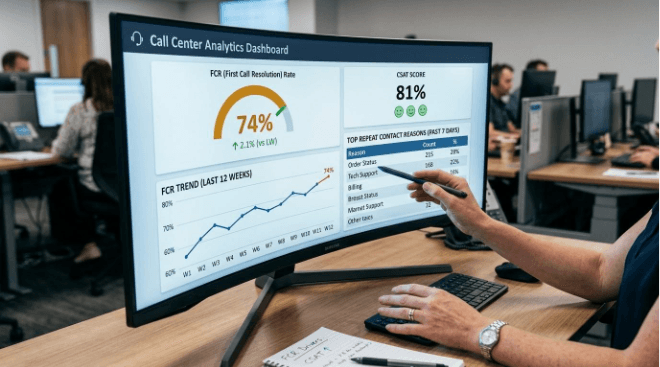
- First Call Resolution (FCR): the percentage of calls fully resolved without a callback or repeat contact. The single best indicator of whether your agents are actually equipped to solve problems, not just answer calls.
- Average Handle Time (AHT): the average duration of a full interaction, from greeting to documentation. Watch this alongside FCR, not instead of it — a low AHT achieved by rushing customers off the phone will tank your resolution rate and your customer satisfaction right along with it.
- Call Abandonment Rate: the percentage of callers who hang up before reaching a live agent. This one is mostly a routing/staffing metric, but a spike in abandonment during a specific queue often points to a resolution bottleneck backing up the line, not just a staffing shortfall.
Track these together. A contact center that only watches AHT will optimize for short, unresolved calls. One that only watches FCR without watching AHT may be solving problems well but taking too long to do it. The goal is improving both at once, which is exactly what happens when agents are guided to the right resolution path quickly, instead of finding it through trial and error.
Frequently Asked Questions
What is an example of inbound call handling? A customer calls about a billing discrepancy. The agent greets them, asks what's going on, verifies their identity, pulls up their account and prior tickets, works through a guided troubleshooting flow to identify the cause of the discrepancy, resolves it or escalates to billing support if needed, and logs the outcome in the CRM before ending the call. Each step, not just the friendly greeting, is part of inbound call handling.
What's the difference between inbound and outbound calls? Inbound calls are initiated by the customer, usually for support, questions, or complaints. Outbound calls are initiated by the business, usually for sales, follow-ups, or proactive outreach. The agent skills, tools, and KPIs for each are different, even when the same team handles both.
What is call routing? Call routing is the process of directing an incoming call to the right agent, team, or department, typically using an IVR menu and an ACD (automatic call distribution) system, based on caller input, skill matching, or availability. Routing determines who picks up the call; it doesn't determine how well that call gets handled once it's answered.
How do you handle a high volume of inbound calls without sacrificing quality? Smart routing and adequate staffing keep queues moving, but volume alone isn't usually what causes quality to drop — inconsistent resolution paths are. When every agent is guided through the same structured decision tree, a busy day doesn't force a choice between speed and doing it right, because agents aren't spending extra time hunting for the correct next step under pressure.
What software helps with inbound call handling? Two categories, doing two different jobs. Routing tools (IVR, ACD, cloud phone systems) get the call to the right person. Resolution tools (guided decision trees like Process Shepherd) help that person actually resolve the issue once they're on the line. Most contact centers have invested in the first category and left the second to agent experience and knowledge base searches, which is usually where the real inconsistency in call quality comes from.
See how it works at processshepherd.com — free trial, no credit card required.
Nola Neven
AuthorNola Neven is a content strategist in the CX space, focused on turning complex operational problems into clear, credible content that people actually read, reference, and share. Her work sits where content and operations meet. She spends her time understanding how contact centers and help desks really function day to day, where workflows break down, where teams rely on workarounds, and where systems quietly slow everything down.